
Core concepts
Chat sessions vs code sessions
GATE has two distinct kinds of session, and it helps to keep them straight.
A chat session is the conversation you have with your bot — the one you type into, with a URL you can return to.
A code session (a "CS") is a separate Claude Code worker that your bot spawns to actually build software.
You talk to the chat; the chat talks to the code session.
This page explains the three actors involved and the two loops that connect them.
The three actors
GATE uses a fixed vocabulary for who does what during a build:
- You (the user) — the human. You launch the work, then mostly step back. You read progress and decide when to stop.
- The chat — your bot's own session. It is the orchestrator: it talks to you, spawns the code session, drives and reviews it, merges the resulting pull request, and chains the next step.
- The CS (code session) — a Claude Code process the chat spawns to do the actual building. It works heads-down and reaches a natural stopping point when its pull request is open.
So your bot wears two hats: in the chat it is the manager, and the code session it spawns is the worker.
The two loops
These actors are connected by two communication loops that behave very differently.
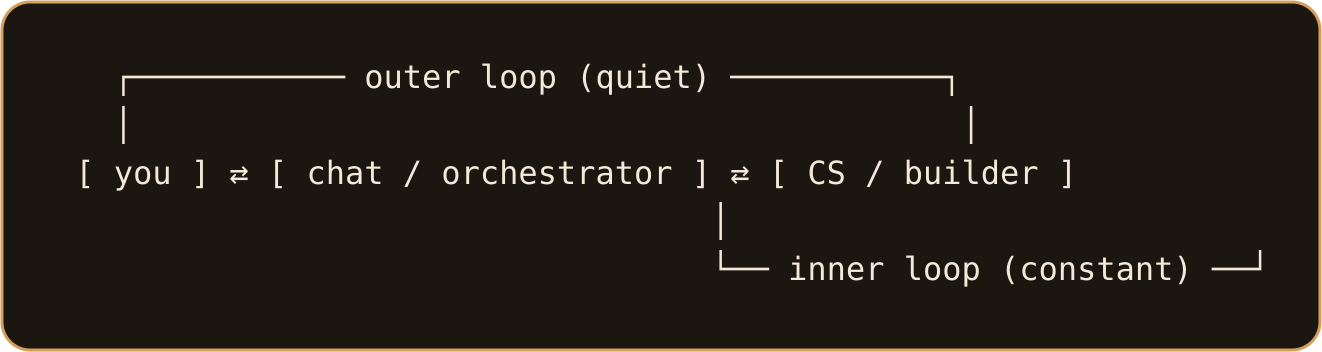
- Outer loop — you ⇄ chat. This stays quiet. You kick the work off and then check in when you want a status update. During an autonomous build, the chat is instructed never to ping you.
- Inner loop — chat ⇄ CS. This is constant traffic. The code session keeps "nudging" the chat when it needs attention (a monitor watches the CS and wakes the owning bot), and the chat reads the transcript and responds.
There is a deliberate distinction here: a nudge runs from the CS back to the chat, and is expected. A ping runs from the chat to you, the human — and during an autonomous build it is avoided. They point in opposite directions, so it is easy to mix them up.
How the chat drives a code session
The chat owns the whole lifecycle of a code session: it starts the CS, drives it (sending follow-up instructions when the monitor flags that input is needed), reviews the result, and stops it once the work is done.
A code session does its work in its own git worktree on its own branch, separate from your main code.
When it finishes a slice of work, it opens a pull request.
Importantly, an open PR means the code session has stopped — not that the build is finished.
The chat then reviews and merges the PR and decides what happens next.
This is the default model for code changes in GATE: open an issue, spawn a CS on a branch, let it open a PR, and have the bot merge after review. See Build and deploy an app for the end-to-end flow.
Related concepts
- Signals are self-triggers — scheduled or one-shot prompts a bot sends back into a session. They are how a chat can "wake itself up" to check on a long-running code session, or remind you of something later.
- Session recovery (compact and recover) repairs a chat session that has grown too large or hit an error, by trimming or rewriting its stored transcript.
Acknowledging a code session ends it — there is no acknowledge-but-keep-running variant. To keep a session alive, the chat sends more input rather than ending it. If the chat wants a session running but quiet, it can switch it to passive monitoring — the session keeps working and activity is still logged, but pings stop.
For more on what a bot can do inside these sessions, see Skills and capabilities and Organizations, users, and bots.
Going deeper: the Developer track covers the code-session model in detail, and Agents & autonomous building explains how the chat drives code sessions through a full build loop.