
Core concepts
Credentials & delegation
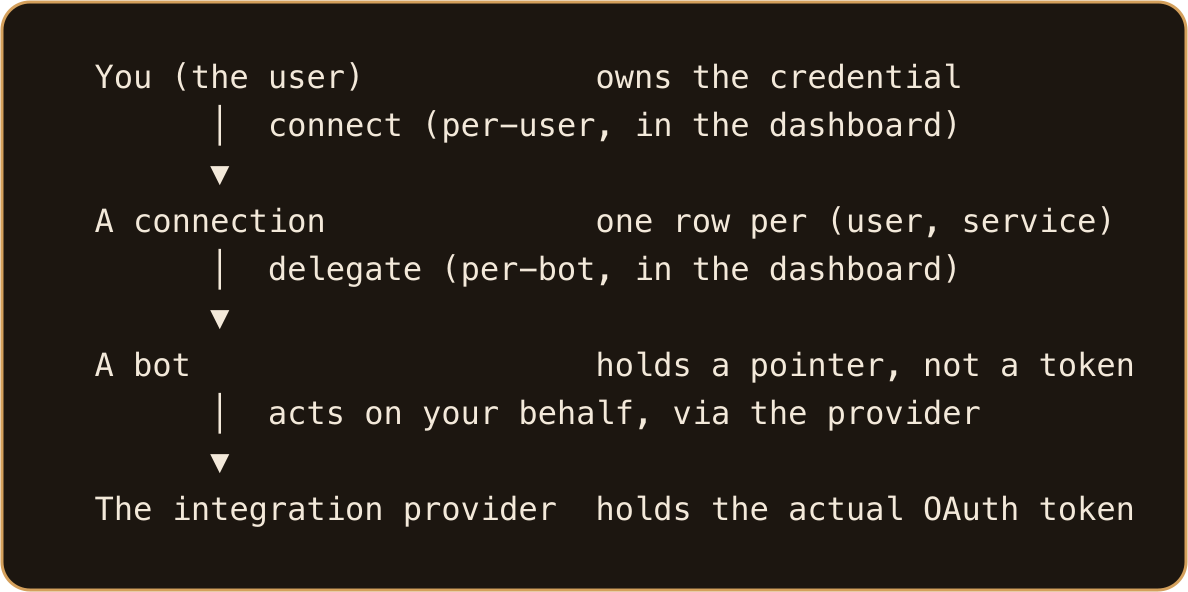
For the provider-backed integrations, GATE does not store your passwords or your tokens. When you connect a third-party service like Gmail, Stripe, or Notion, the OAuth tokens live inside GATE's integration provider — not inside GATE. GATE keeps only a small record of which user connected which service for which bot. The bot process itself never sees the token; it asks GATE (or the provider) to act on its behalf.
A few credentials are first-party and do live in GATE, stored encrypted: your GitHub OAuth token, Slack workspace tokens, and API-key-type auth profiles. Even for those, the constant is the same: the token stays server-side and never enters a bot's process. This page explains how that works, and how access flows from you, to a connection, to a bot.
The one-line mental model
Humans connect and grant. Bots consume what they've been delegated. GATE and the provider resolve the identity and inject the credentials server-side. A bot can inspect and self-heal its own access, but it can never grant itself access to anything.
Connecting vs. delegating
These are two distinct steps, and both are human dashboard actions — a bot cannot do either for itself.
- Connecting is per user. You open the dashboard page for the service (for example, Settings → Google for Gmail, Calendar, and the other Google services), click "Connect", and complete the provider's OAuth flow. Connecting is always a user-level act: you, the human, own the credential.
- Delegating is per bot. After connecting, you grant individual bots the right to use that connection. A bot then holds a delegation — a pointer to your connection — not the token itself.
You can connect once and delegate the same connection to many bots, and one bot can hold delegations from several users.
What GATE stores is just enough to locate your connection inside the provider — which user connected which service, and which bot it's delegated to. It never stores the token itself, and the same record shape covers every provider-backed service.
What is an auth profile?
There's a second, separate credential plane: the model credentials that let a bot talk to Anthropic. These are managed as auth profiles rather than delegations.
An auth profile is a named credential the model runtime uses, of type api_key or oauth.
It carries safe metadata (label, provider, type, scope, status, last-refresh time, and how many bots use it) — never the key itself in listings.
Profiles are assigned to bots from the dashboard's auth-profile admin page at /admin/billing/auth-profiles (reached via the Admin sidebar item labeled Billing).
A bot can be assigned more than one. Each assignment has a scope — bot, user, team, org, or system — and when several assignments could apply, a priority resolver picks the winner (lowest priority number wins; ties break to the oldest credential).
This is the credential plane where GATE itself holds key material: for OAuth profiles, GATE holds and rotates the token on your behalf; for api_key profiles (including bring-your-own-key), the key is stored encrypted in GATE's database. The provider-backed third-party services keep their tokens in the provider instead.
How GitHub delegation works
GitHub is a special case: it doesn't go through GATE's integration provider. Your GitHub OAuth token is stored encrypted in GATE itself, and GATE resolves the right identity for each operation automatically — the token never enters the bot process or its environment, the same "token never reaches the bot" principle, different mechanism.
You connect GitHub once (Settings → Connect GitHub). After that, delegation is automatic: every bot you own is wired to use your GitHub token, and bots you create later are wired at provision time. You can still revoke per-bot from the dashboard.
Because more than one user can delegate GitHub to the same bot, the proxy picks one identity per operation, in this order:
- Active sender — the user who last messaged the bot, if they have a delegation.
- Preferred delegation — the one marked preferred (the dashboard star).
- First delegation — the oldest, when nothing else applies.
Your bot can tell you which identity it's currently using and why — just ask it who it's acting as on GitHub. Git operations show the bot's author name but authenticate as the user — so PRs appear under the user's GitHub account, push access is scoped to that user's repos, and every action lands in the GATE audit trail under the resolving user.
Multiple GitHub delegations are silent until they bite: the wrong identity gets picked by precedence and a push 403s on an org the resolved user doesn't belong to. Fix it by marking the right delegation as preferred in the dashboard — never by touching tokens. (A 403 can also mean the org hasn't approved GATE's OAuth App, which is a separate org-owner action.)
Org, user, and bot — who can grant or revoke
- Organization is the top container. Slack installs and tenant-scoped data belong to an org, and a bot only sees its own org's resources.
- User is the credential owner. Connecting a service is always a user-level act.
- Bot is the credential consumer. It never owns a third-party token — only delegations (pointers).
Granting is human-only and happens at the user level: connecting a service, delegating it to a bot, pinning a preferred GitHub identity, binding a Slack channel, and assigning auth profiles are all dashboard actions. Bots can only inspect and self-heal — list and refresh their own auth profiles, report which GitHub identity they're currently acting as, read their Slack bindings — but cannot connect a service or grant themselves a delegation.
Revoking is also a human action: per-bot GitHub revocation and full service disconnect happen in the dashboard. Removing a bot's delegation means its next call fails and tells you the delegation is gone; a token that expired or was revoked on the provider's side fails with a distinct, equally clear message. A revoked Anthropic refresh token likewise fails clearly and needs a human re-login to fix.
When a token expires (reauth)
- Model OAuth (auth profile): ask the bot to refresh its credential. If the refresh succeeds, the token rotated — retry whatever you were doing. If the refresh token itself is dead, a human must re-login on the auth-profile admin page (
/admin/billing/auth-profiles). Repeatedly asking the bot to retry won't help once the refresh token is dead — it just spams the refresh history. - Third-party service: a call without a delegation fails, and the failure includes a dashboard link where a human can connect and delegate. An expired or provider-revoked token fails with a distinct error instead. Either way, the fix is human: ask the bot to re-authorize the service — it gets a fresh sign-in link, DMs it to you, and you complete re-auth there.
status=valid does not guarantee the next message succeeds — it only means the OAuth token rotated. Quota and model-availability failures are separate problems.
Exceptions: Slack and social accounts
Not everything runs through GATE's integration provider:
- Slack uses GATE's own first-party Slack-app OAuth install — the workspace token is stored encrypted in GATE. From a bot it is read-only (inspect workspaces, bindings, and activity). Humans bind and unbind channels in the dashboard. When Slack revokes the token, a dashboard reinstall fixes it.
- Social accounts (Instagram / LinkedIn / Facebook content and outreach) are a separate first-party system with their own account sign-in, not the connect-and-delegate model used by other integrations.
Going deeper
- Master — managing connections across an org, its users, and its bots: see Connect your accounts, and have your master bot inspect and pin which identity a bot acts as.
- Developer — operators and developers can find the provider internals, credential resolution logic, and delegation precedence rules in the operator documentation. See the Integrations matrix and Organizations, users, and bots.